Round table design principles for smart hardware spaces
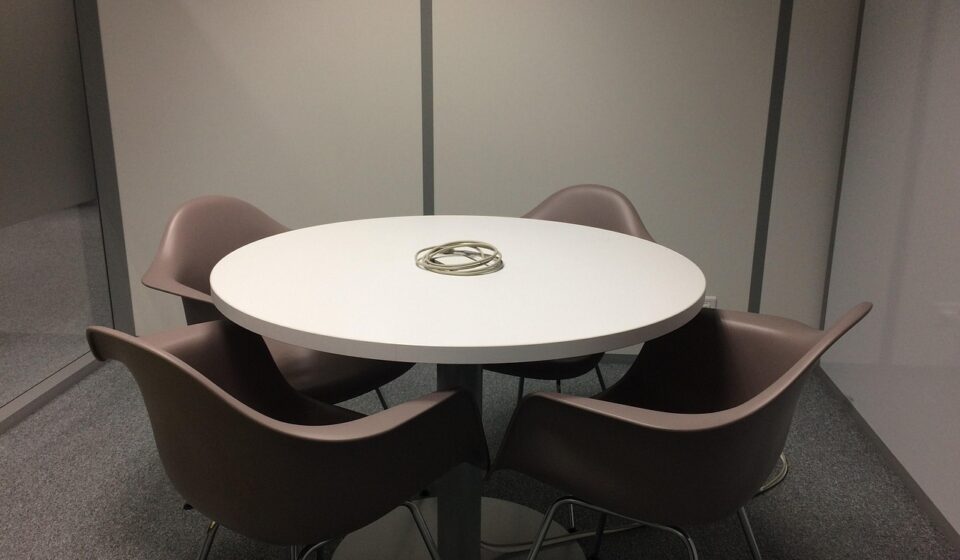
The design problem a round table actually solves
Round table design is useful when a space needs equal sight lines, easy conversation and softer circulation rather than maximum seat count. In smart hardware spaces such as meeting rooms, product labs, showroom demos and connected home hubs, the table also has to support power, sensors, displays and maintenance access without turning into a cable nest. A sound design starts with diameter and user posture, then resolves base geometry, accessibility clearance, surface durability and electronics as one system. The main trade-off is scale: round tables feel inclusive at small and medium diameters, but they become inefficient when the center is too far to reach or when everyone needs to face one wall display.
The round form changes behavior because it removes the head-of-table position. That can make a review session, control-room discussion or prototype critique feel less hierarchical. It also helps traffic flow because there are no sharp corners projecting into walking paths. These qualities matter in compact rooms where people enter, stand, sit, pass devices around and move between screens.

The same geometry creates limits. A round table uses floor area differently from a rectangle, and a large circular top can put shared objects too far from seated users. If the room depends on a single front display, some users may have to twist their necks or rotate their chairs. The design question is not whether round is more modern. It is whether the circle supports the task, the people and the technology in the room.
Size, reach and accessibility should be specified early
Diameter is the first hard decision. A round tabletop grows in area quickly, while usable edge length grows only with circumference. That is why a small increase in diameter can improve comfort, but an oversized top can push devices, documents and shared controls out of reach. In early planning, designers often estimate seating by combining table circumference, chair width, elbow room and the space needed for laptops, plates or hardware samples.
For U.S. public and commercial settings, accessibility cannot be treated as a late styling adjustment. The 2010 ADA Standards for Accessible Design state that accessible dining and work surfaces must have tops 28 to 34 inches above the finished floor. The standards also define a clear floor or ground space of at least 30 by 48 inches and specify knee and toe clearance requirements for forward approach. Department of Justice guidance further explains that where dining surfaces are provided, at least 5 percent of seating and standing spaces at those surfaces must comply with the relevant accessible surface requirements. (access-board.gov)
The table below is a practical planning guide, not a code table. Final dimensions should be checked against the chair, base, floor plan, intended users and local requirements.
| Round tabletop diameter | Typical comfortable use | Design notes |
|---|---|---|
| 36 to 42 inches | Two to four people | Good for compact demo corners, informal check-ins and small devices. Surface area becomes tight when every user has a laptop. |
| 48 inches | Four people | A balanced size for short product reviews, smart home controls or a small collaboration table. |
| 54 inches | Four to six people | Useful when samples, tablets or shared test equipment need more surface area without making the center feel remote. |
| 60 inches | Six people, sometimes more with narrow chairs | Often the upper practical range for comfortable conversation and reach. Check center access, chair pull-out and base clearance carefully. |
| 72 inches and above | Special cases | Large circles can reduce reach and increase floor demand. An oval, racetrack or modular layout may serve larger groups better. |
Room planning has to include more than the tabletop. Chairs need pull-out space, users need a path around occupied seats, and service staff or engineers may need access to wall panels, cabinets or display equipment. A table that looks correct in plan view can fail once chairs, bags, cable drops and moving users are added.
Base geometry affects comfort, stability and wiring
The base is one of the most important decisions in round table design because it affects knees, feet, stability, manufacturing cost and cable routing at the same time. Four legs can be structurally simple and visually light, but they may land exactly where a user wants to sit. A pedestal base opens the perimeter and often improves chair flexibility, yet it can create a heavy central obstruction if the column or foot is too large.
For connected furniture, the base may also become the service spine. Designers may route power through a pedestal, hide a battery module in a weighted foot, or use the center column for cable management. This can be elegant, but it adds constraints: the base must remain stable, accessible for maintenance and compatible with knee and toe clearance targets. The ADA Standards note that clearances are measured in relation to usable clear floor space, and obstructions under an object matter when determining clearance.
Stability should be evaluated in the use scenario, not only in a static render. Users lean on edges, place hardware near one side, pull cables, move chairs into the base and sometimes push the table when standing up. If the product will be used in a lab or public demo environment, the design team should prototype the underside as early as the top. A refined tabletop with a late-stage base often creates ergonomic compromises that are difficult to correct.
Smart hardware integration changes the tabletop
A connected table is also a product interface. People may not notice the electronics first, but they will notice whether charging, controls and cables fit their natural movement. The human-centred design framework in ISO 9241-210:2019 is relevant here because the standard addresses human-centred design across the life cycle of interactive systems and notes that both hardware and software components can affect human-system interaction. ISO lists the 2019 second edition as published and reviewed as current in 2025. (iso.org)
For a round table, the center is the obvious location for shared power and data, but it is not always the best user experience. A central port cluster can be fair to all users, yet it can force cables across the working surface. Edge-based ports reduce cable reach, but they may create ownership problems when several users need outlets at the same time. Wireless charging zones can reduce visible clutter, but they still need clear placement cues, heat consideration and service access.
Smart hardware features should be selected according to the task. A collaboration table may need microphones, low-profile cable doors and a central device tray. A showroom table may need hidden power, lighting control and secure mounting points. A product lab table may need replaceable inserts, grounded work surfaces or protected cable exits. In all cases, mains power, batteries and low-voltage electronics should be designed with certified components and reviewed against applicable electrical and safety requirements rather than improvised as furniture details.
Controls should also respect the circular layout. A single control panel creates a favored seat; multiple controls add cost and potential confusion. One approach is to separate personal controls from shared controls: place individual charging and connection points near seats, then keep shared display, lighting or conferencing controls in a visible central zone. See also: BUYING GUIDES.
Materials and finish decisions are user interface decisions
Material choice affects how the table feels, sounds, cleans and ages. A glossy surface can look premium in a render but reflect overhead lighting or screens. A soft-touch coating can improve comfort but may show scratches. Solid wood and veneer can add warmth, while laminate, compact laminate, metal, glass and engineered composites may offer different advantages in durability, cost, cleanability or repair.
Furniture sustainability is also becoming more structured. BIFMA describes ANSI/BIFMA e3 as a furniture sustainability standard covering environmental, health and wellness, and social impacts, and identifies e3-2024 as the sixth edition. BIFMA also lists ANSI/BIFMA X10.1-2024 as an ergonomics requirements standard for furniture designed for computer use, connecting furniture dimensions with measurable ergonomics principles from relevant ISO 9241 parts. (bifma.org)
For product teams, the practical lesson is to define finish performance before styling is locked. Ask whether the surface will see hot devices, sanitizing, stylus use, lab tools, fingerprints or frequent cable movement. Specify edge radius, scratch tolerance, repair method, component access and cleaning expectations. A table used around smart hardware is not just a dining object or office object; it is a work surface, meeting surface and device interface at the same time.
Round versus rectangular designs
A round table is not automatically better than a rectangular one. The right shape depends on room geometry, group size, display orientation and the type of work being done. The comparison below can help a product or interiors team make the choice before moving into CAD refinement.
| Criterion | Round table | Rectangular table | Product design implication |
|---|---|---|---|
| Conversation | Strong eye contact and balanced participation for small groups | Clear sides and ends, but more hierarchy | Round works well for reviews, brainstorming and shared demos. |
| Room efficiency | Can demand more circulation area around the perimeter | Often fits walls, long rooms and linear seating more efficiently | Check the occupied footprint, not just tabletop size. |
| Display viewing | May create awkward angles toward a single wall screen | Can align users toward a front display | Round is stronger when displays are central, distributed or secondary. |
| Power integration | Central routing is clean but can pull cables across the surface | Linear cable troughs and edge ports are easier to organize | Round designs need an early cable and service strategy. |
| Scalability | Less efficient for large groups because reach becomes a problem | Extends more naturally for larger meetings | Use round for focused groups; consider oval or modular forms for scale. |
Prototype checklist for product design teams
Before committing to tooling, vendors or a final furniture specification, a round table concept should be tested as a full use scenario. This is especially important when smart hardware, charging, microphones, sensors or room-control features are involved. The Human Factors and Ergonomics Society describes workstation design in terms of system-level integration, anthropometric accommodation, postural criteria, adjustability and spatial relationships, which is a useful mindset for evaluating connected tables as more than static objects. (hfes.org)
- Define the main task: conversation, dining, lab review, showroom demo, conferencing or smart home control.
- Choose the seating target before the diameter, not after it.
- Mock up the real chair, not a generic chair from a render library.
- Check reach to the center with laptops, tablets, samples and cables on the surface.
- Verify chair pull-out, circulation and clear floor space when the room is occupied.
- Test base interference with feet, knees, wheelchairs and cleaning equipment.
- Decide whether power belongs at the center, edge, floor box or wall.
- Plan removable access panels for electronics and cable service.
- Evaluate glare, fingerprints, sound, edge comfort and cleaning on real finish samples.
- Document which requirements come from code, which come from standards and which are project assumptions.
For more perspectives on form, usability and connected hardware, see the Product design section.
Frequently asked questions
What diameter should a round table be for four people?
A 48-inch diameter is a common planning size for four adults when the table also needs space for laptops, tablets, small devices or documents. A 42-inch table may work for compact rooms, but it leaves less surface area for product samples and shared hardware.
Is a round table better for small rooms?
It can be, especially when the room needs softer circulation and no sharp corners. However, a round table still needs chair pull-out and walking space around the perimeter. In a narrow room, a rectangle, oval or wall-adjacent drop-leaf design may use space more efficiently.
Are pedestal bases always better for round tables?
No. A pedestal can improve seating flexibility by removing legs from the perimeter, but a wide central column or heavy foot can interfere with knees, feet or accessibility clearance. The best base depends on diameter, weight, user posture, wiring and stability requirements.
How can power be added without making the table messy?
Start by mapping user positions and device types. For small groups, a central covered module may be enough. For heavier device use, combine edge access, under-table cable management and serviceable power routing through the base or floor. Avoid adding ports after the form is finalized.
When should a designer choose an oval instead of a round table?
An oval is often better when the group is larger, the room is longer than it is wide, or users need a clearer orientation toward a display. It keeps some of the softer circulation benefits of a round table while scaling more efficiently for larger meetings.